
A public API rate limit policy is a published contract: it caps how many requests a client may send to each endpoint inside a fixed time window, defines how the API identifies that client, and states exactly what comes back when the cap is hit. Designing one well takes an afternoon of measurement and a week of paperwork, because the hard part is not the counter, it is the numbers and the wording.
I have watched teams spend days arguing about token bucket versus sliding window while their actual problem was that nobody had measured endpoint cost or decided who counts as a partner. Get the client classes and the capacity model settled first and the algorithm choice becomes obvious in five minutes.
This guide walks through that order: prerequisites, a practical sequence, the response contract, rollout, and the mistakes that generate support tickets. It is written for developers and API teams, and for civic technology leaders running open-data endpoints where one careless integration can take a public service offline.
Table of Contents
- What You Need
- Step-by-Step: How to Design a Public API Rate Limit Policy
- Choose Client Classes and Endpoint Costs in a Public API Rate Limit Policy
- Select a Limiting Algorithm and Enforcement Window
- Define Headers, Status Codes, and Retry Behavior
- Roll Out, Test, and Observe the Policy
- Policy Mistakes and How to Fix Them
- Common Mistakes and Final Tips
- Frequently Asked Questions
- What is the best algorithm for a public API rate limit?
- How should anonymous users be rate limited compared with registered clients?
- Should every API endpoint have the same rate limit?
- How do I return rate limit information in response headers?
- What is the difference between HTTP 429 and HTTP 503?
- How can I prevent clients from bypassing rate limits?
- Conclusion
What You Need
Most bad rate limit policies fail at this stage, not at the implementation stage. Before you pick a single number, collect six things.
- A traffic baseline. Average and peak request volume for the last 30 days, broken down by endpoint and by hour. You cannot defend a number without the curve behind it.
- Service capacity. The actual request ceiling your database, cache and downstream services can hold while staying inside your latency targets. A limit above this number is not protection, it is a promise you will break.
- A client identity model. What you can actually observe about callers: API key, OAuth client ID, JWT subject, source IP, subscription tier, or some combination.
- Endpoint cost weights. Which endpoints are cheap reads and which are expensive: a full-text search over 400k records costs far more than a key lookup.
- Gateway and shared store capability. Whether your API gateway can enforce limits natively, and where your shared counters will live so limits hold across every app server.
- An owner. The team that reviews limits quarterly and answers quota requests. Without a name attached, the policy rots.
A municipal open-data example: a parking-availability API serving 40 hours of sensor data per intersection, with a city dashboard as a registered client, two approved research partners, and roughly 300 anonymous script writers. Documenting those three classes, the cost of the availability query versus the metadata query, and the p95 latency at peak load is what makes the rest of the design arguable.
Step-by-Step: How to Design a Public API Rate Limit Policy

The framework runs in a fixed order, and each stage feeds the next. Skipping ahead produces policies that are technically enforceable and operationally useless.
Choose Client Classes and Endpoint Costs in a Public API Rate Limit Policy
Clients are not all the same, and an API key alone will not tell you who they are. Start by classifying callers into anonymous, trial, registered, partner, internal and production tiers, then bind each class to an identity signal you can verify: a signed JWT subject for production partners, an API key bound to a named organisation for registered developers, an IP plus a session fingerprint for anonymous traffic.
The NAT trap is the reason you need more than IP. A single office egress address can represent 300 employees, and a university campus can represent thousands. IP-only limits throttle innocent users for the behaviour of one bad actor. IP limits still belong in your design, but as a secondary abuse control, not as your primary quota key.
Next, weight the endpoints. Instead of “100 requests per minute” apply a credit system: a simple key lookup costs 1 credit, a filtered list query costs 5, a bulk export costs 50. A client spending 100 credits per minute gets 100 cheap calls or two heavy ones. This is what keeps a legitimate integration working while stopping one script from running a thousand expensive queries an hour.
A workable capacity model looks like this. If your safe ceiling is 600 requests per second and roughly 70 percent of real demand sits with registered clients, you might allocate 300 to registered accounts, 120 to partners, 100 to anonymous traffic as a shared pool, and hold 80 as headroom. Each class gets a ceiling sized from measured capacity, not from what competitors publish.
| Client class | Identity signal | Credit allowance per minute | Burst allowance | Quota increase path |
|---|---|---|---|---|
| Anonymous | IP address | 30 credits, shared pool | 10 credits | Register for a key |
| Trial | API key | 60 credits | 20 credits | Upgrade to paid tier |
| Registered | API key + JWT subject | 300 credits | 100 credits | Support request with use case |
| Partner | OAuth client ID | 1,200 credits | 400 credits | Contracted SLA |
| Internal | Service identity token | 2,000 credits | 600 credits | Platform team review |
These numbers are illustrative. Yours come from your own capacity measurement, and the tier names should reflect your service.
Select a Limiting Algorithm and Enforcement Window
Once classes and costs exist, pick the algorithm that matches the burst behaviour you want. Five options cover almost every public API.
| Algorithm | Burst behaviour | Precision | Memory cost | Best fit |
|---|---|---|---|---|
| Fixed window counter | Allows double traffic at the boundary | Low | One integer per client | Simple APIs, low stakes, fast to ship |
| Sliding window counter | Smooths the boundary spike | Medium | Two integers per client | Most public APIs with uneven traffic |
| Sliding log | Exact, no bursts past the cap | High | One entry per request | Low-volume endpoints, strict fairness |
| Token bucket | Absorbs bursts up to capacity, then steady refill | High | Two values per client | APIs with legitimate traffic spikes |
| Leaky bucket | No bursts at all, smooths output | High | Queue per client | Downstream systems needing a fixed drain rate |
Token bucket is the safe default for a public API and the one most teams end up with. Each client gets a bucket with a capacity and a refill rate. Every request spends one credit (or the endpoint’s weight), credits trickle back at the refill rate, and a full bucket lets a client burst without dropping. Stripe’s public engineering write-up is the reference implementation developers cite most often, a token bucket held in Redis.
For enforcement across many servers, counters must be shared and atomic. Store them in Redis or an equivalent, increment with an atomic operation or a small Lua script, and set a TTL tied to the window so stale entries expire on their own instead of leaking memory. The community advice is consistent here: a read-then-increment in application code loses updates under concurrency, and sticky sessions are not a substitute for a shared store. A developer asking about exactly this on r/Backend received the same answer, use Redis with atomic increments and skip session affinity.
A minimal Redis-backed check in Python looks like this:
import time, redis

r = redis.Redis(decode_responses=True)

def allow(key, limit, window_seconds):
    bucket = f"rl:{key}:{int(time.time()) // window_seconds}"
    with r.pipeline() as pipe:
        pipe.incr(bucket)
        pipe.expire(bucket, window_seconds)
        used = pipe.execute()[0]
    return used <= limit, used
Note the TTL on every key and the atomic increment. Swap the fixed window for a Lua script the moment a client can burn double its quota across a window boundary.
Define Headers, Status Codes, and Retry Behavior
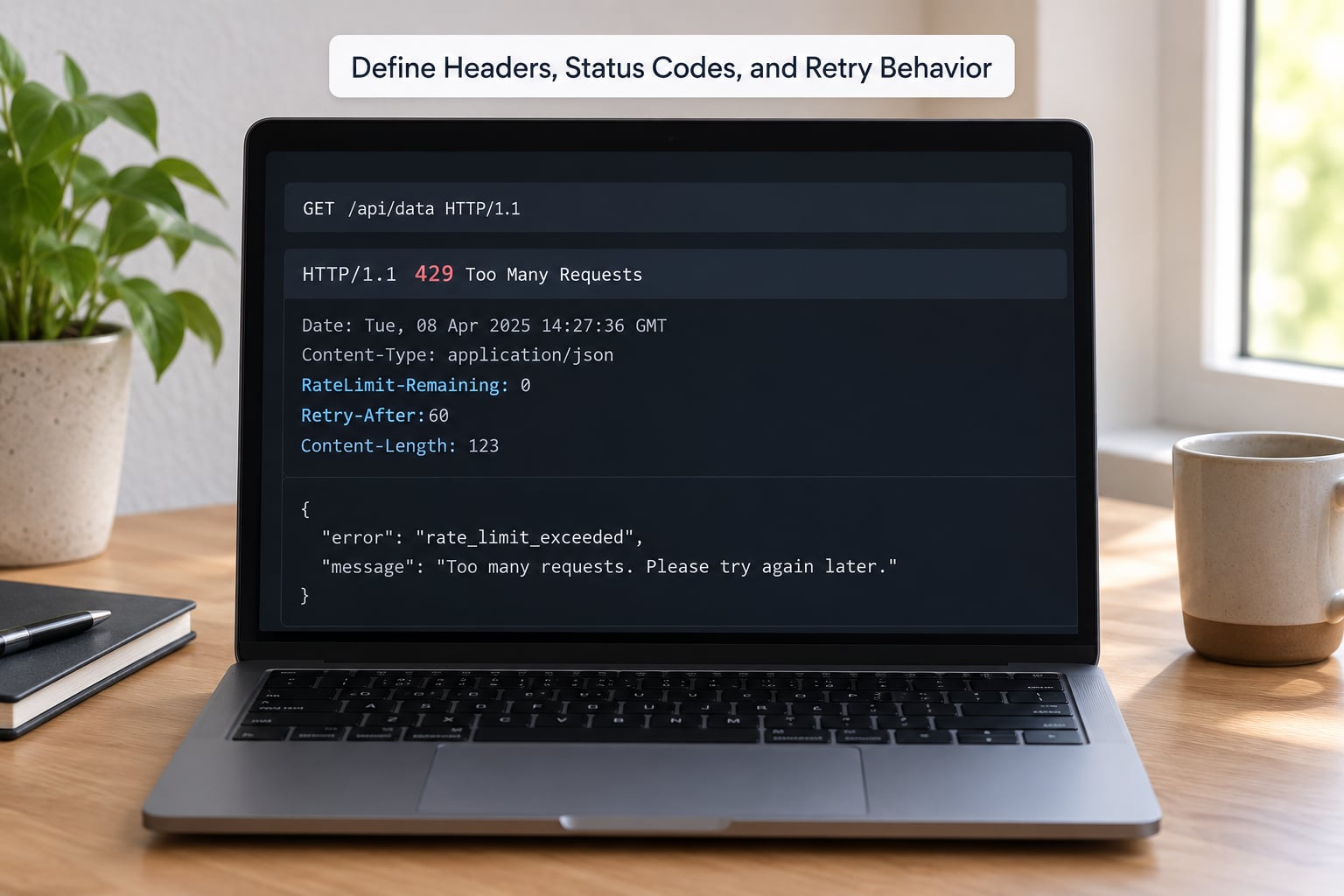
This is where most policies disappoint developers, and it shows up as forum complaints. Rate limit headers that appear on a 200 response but vanish on the 429 leave a client unable to self-throttle, which is exactly the failure developers describe on the Alpaca Markets forum. Send the full header set on every response, success or rejection.
| Header | Meaning | Example value | When it appears |
|---|---|---|---|
| RateLimit-Limit | Quota for the current window | 300;w=60 | Every response in scope |
| RateLimit-Remaining | Credits remaining before rejection | 17;w=60 | Every response in scope |
| RateLimit-Reset | Seconds until the window refills | 42 | Every response in scope |
| Retry-After | How long to wait before retrying | 30 | Required on 429 |
A 429 body should name the policy in plain language:
HTTP/1.1 429 Too Many Requests
Content-Type: application/json
Retry-After: 30

{
  "error": "rate_limit_exceeded",
  "message": "Registered tier allows 300 credits per minute. Retry in 30 seconds.",
  "tier": "registered",
  "limit": 300,
  "window_seconds": 60,
  "remaining": 0,
  "reset_seconds": 30,
  "docs_url": "https://api.example.org/docs/rate-limits",
  "quota_request_url": "https://api.example.org/support/quota"
}
Keep status codes unambiguous. A 401 or 403 means authentication or authorisation failed and retrying changes nothing. A 429 means this specific client exceeded its quota and retrying later will work. A 402 or a 403 with a quota reason means the account is out of allowance for the billing period. A 503 means your service is unhealthy, and throttling clients at that moment only makes the incident worse. Conflating them is one of the most common causes of support load.
Tell clients to back off with exponential delay plus jitter, starting around one second and capping around sixty, and to respect Retry-After as a floor rather than a target. Then tell them the three things that actually help: cache what you read, batch requests where the API supports a bulk form, and stop retrying a 429 until the reset time you were given.
Roll Out, Test, and Observe the Policy
Do not switch enforcement on the day you publish. Run the limiter in shadow mode first: compute every decision, log what it would have done, and serve all requests normally. Two weeks of that tells you how many legitimate callers would have been throttled, which is the number you need before you publish anything.
After that, stage it: internal clients, then registered developers, then anonymous traffic. Load test the limiter itself at two to three times your observed peak, and test what happens when the counter store is unreachable. Fail open on read errors for read-only endpoints so a Redis blip does not become a total outage, and fail closed on expensive or authentication-related endpoints.
Put four metrics on a dashboard: rejection rate by client class, p95 latency at the limiter, share of traffic rejected, and the top ten keys by credit consumption. Alert when the rejection rate crosses a few percent for any class, because that is almost always either an attack or a bug, and both need a human within the hour.
Set review triggers before you need them: any p95 latency breach, any outage, any class rejecting more than a quarter of its requests, or any change in upstream capacity. And decide the carve-out policy in writing. For a city service, that usually means a named partner path for emergency and essential-service callers, with the quota documented and reviewed rather than granted informally.
Policy Mistakes and How to Fix Them
| Mistake | Why it hurts | Fix |
|---|---|---|
| One global limit on every endpoint | A cheap metadata call burns the same credit as a full export | Weight endpoints by cost |
| IP-only identification | Offices, campuses and carriers throttle hundreds of innocent callers | Key on API key or JWT, keep IP as a secondary control |
| Hard rejection of any spike | Holiday shopping, election night and breaking news all look like abuse | Token bucket with a generous burst capacity |
| Missing headers on the 429 | Clients cannot self-throttle, so they retry in a tight loop | Send the header set on every scoped response |
| 401, 403 and 429 blurred together | Developers retry auth failures forever | One meaning per status code, documented |
| Limits that cannot be tested | No way to demonstrate a client exceeds a quota before launch | Shadow mode plus a documented test key |
| Changing production limits silently | Integrations break overnight | Version the policy and publish a changelog entry |
Common Mistakes and Final Tips
Two mistakes deserve more than a table row. The first is enforcing limits inside application servers with local memory counters. The moment you run two instances, a client gets double the quota by luck of which server answers, and your policy becomes fiction. Second, treating a rate limit as a binary switch. A soft limit that logs and emails the developer, followed by a hard limit weeks later, gets you the same protection with far less friction.
Then there is the quota request problem. If your policy has no documented path to request more, developers reverse-engineer your limits and file forum tickets asking for increases, as threads on the Miro developer community and RobotEvents forums show. Put a form in your documentation with fields for use case, expected volume and endpoint mix, and publish the response time.
A few closing tips. Start every policy in conservative monitoring mode and tighten from evidence. Publish real examples, including your own 429 response, because developers write better clients from a sample than from a paragraph. Version the policy the way you version your API, with a changelog and a date. Bring support, security and, for public-sector services, the agency stakeholders into the review, since a limit that breaks an emergency integration is a policy problem, not a code problem. And treat rate limits as a product decision: they shape who can build on your platform, which is worth far more than the few units of capacity you are trying to protect.
Frequently Asked Questions
What is the best algorithm for a public API rate limit?
Token bucket for most public APIs. It lets clients burst up to a bucket capacity, then refills at a steady rate, which matches real traffic with morning spikes and batch jobs. Sliding window counters are a good second choice when you want simpler storage and no burst at all. Leaky bucket suits workloads where a downstream system needs a fixed drain rate. Start with the simplest one you can explain in your documentation.
How should anonymous users be rate limited compared with registered clients?
Give anonymous callers a much smaller allowance drawn from a shared pool keyed on IP address, and invite them to register for a key that raises the ceiling. IP-only limiting punishes users behind office NATs and university networks, so keep it modest, add a small burst allowance, and monitor for false positives. Registration should be instant and self-serve, not an email exchange.
Should every API endpoint have the same rate limit?
No. Weight endpoints by what they cost you and charge credits accordingly, so a cheap key lookup costs one credit and a bulk export costs fifty. Then express each class limit in credits per time window rather than requests. One limit across endpoints either starves cheap traffic or lets expensive queries through, and developers notice both failures immediately.
How do I return rate limit information in response headers?
Send RateLimit-Limit, RateLimit-Remaining and RateLimit-Reset on every response in scope, including successful ones, and add Retry-After on every 429. Developers hit exactly this problem when headers appeared on 200 responses but disappeared on rejections. Consistent headers let clients pace themselves instead of discovering the limit through failures.
What is the difference between HTTP 429 and HTTP 503?
A 429 means this client exceeded its quota and the service is healthy, so waiting and retrying will work. A 503 means the service itself is unhealthy or overloaded, and retrying immediately makes it worse. Keep authentication failures on 401 and 403, keep quota exhaustion distinct from throttling, and document which meaning applies to which status.
How can I prevent clients from bypassing rate limits?
Enforce server-side at the gateway or in shared middleware, because client-side controls can be bypassed at will. Keep counters in a shared store with atomic increments and a TTL so limits hold across every instance. Add per-IP and per-account limits underneath the quota, monitor top consumers, and rotate API keys when an account looks compromised. Client-side backoff is courtesy, never enforcement.
Conclusion
Start by measuring. Pull 30 days of per-endpoint request volume and the p95 latency at your safe capacity ceiling, then define your client classes with the identity signal each one can prove. Pilot the policy in shadow mode with full rate limit headers on every response, publish the tiers and the quota request path, and only then turn on enforcement for anonymous traffic.
A public API rate limit policy that balances protection, fairness, predictability and a clear developer experience is the one developers build against happily. Get the numbers from capacity rather than from round figures, and the rest of the design writes itself.